Quantcast
Results 1 to 6 of 6

Thread: Reset to device, \Device\RaidPort0, was issued.

  1. #1
    HHR
    HHR is offline Junior Member
    Enjoys Windows 8 Forums
     
    Join Date
    Mar 2013
    Posts
    3
    Windows 8 MS Internet Explorer 10.0

    Reset to device, \Device\RaidPort0, was issued.

    Im not sure what this issue means, but I looked it up and noticed it ties in with graphics cards

    The problem is that my computer is having problems when playing games like Diablo 3. It'll stop loading and then reload constantly.

    Graphics card: Nvidia Geforce 560 TI

    Reply With Quote Reply With Quote

  2. #2
    Saltgrass is offline Senior Member
    Enjoys Windows 8 Forums
     
    Join Date
    Sep 2011
    Location
    Dallas
    Posts
    324
    Windows 7/Server 2008 R2 Firefox 19.0

    Re: Reset to device, \Device\RaidPort0, was issued.

    I am certainly not an expert in this area, but it seems to be related to a RAID system. Are you drives set up in a RAID? Are you running your system with the SATA controller set to RAID in the bios?

    But it sounds like it might be a drive configuration situation, so describing how your system is configured might be helpful.

    There might even be something related to the PCIe bus and the SATA ports, but that would be dependent on your system.

    Reply With Quote Reply With Quote

  3. #3
    HHR
    HHR is offline Junior Member Thread Starter Thread Starter
    Enjoys Windows 8 Forums
     
    Join Date
    Mar 2013
    Posts
    3
    Windows 8 MS Internet Explorer 10.0

    Re: Reset to device, \Device\RaidPort0, was issued.

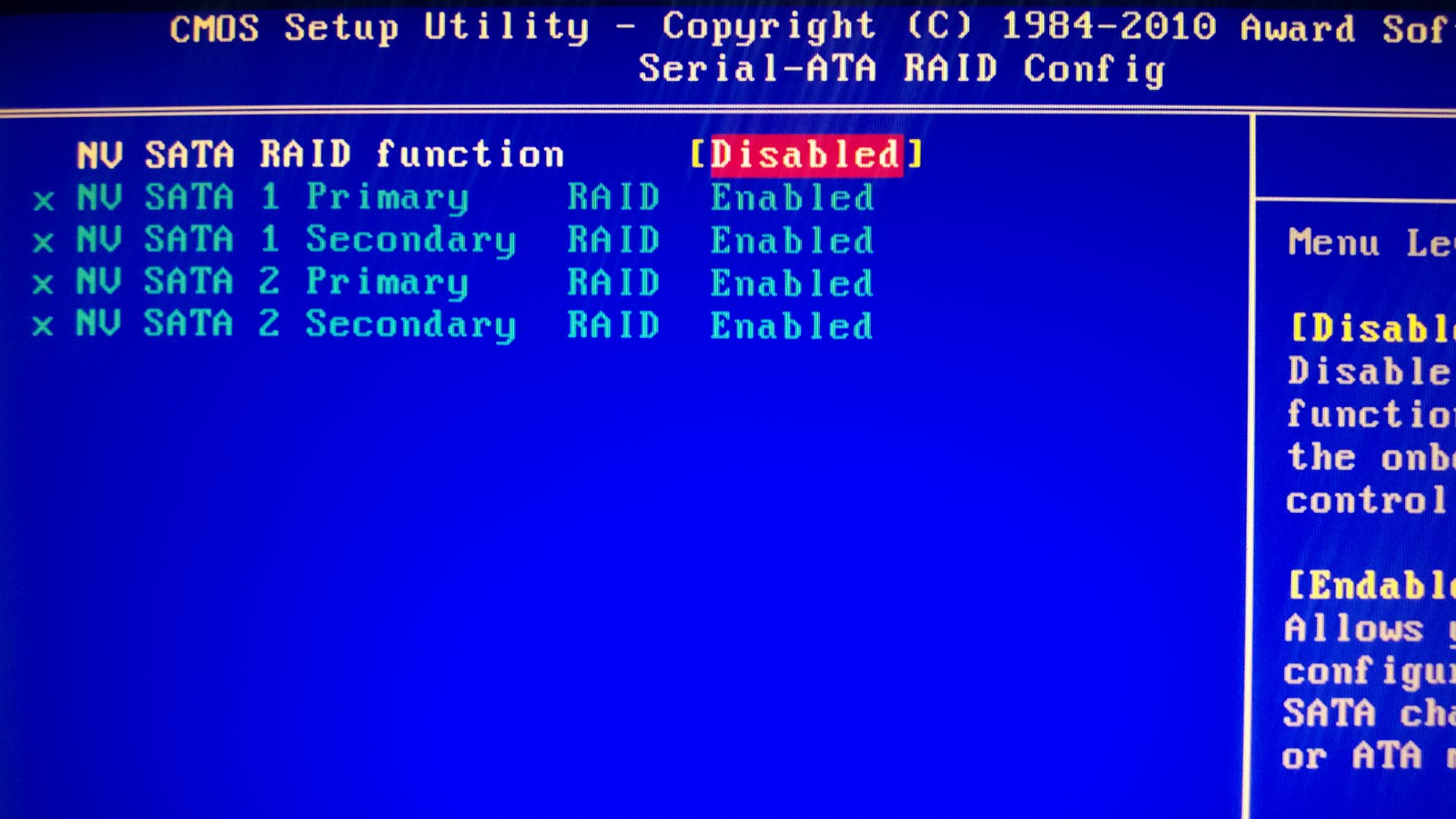
    I went to the BIOS and saw this:


    Now when listening to music I can hear the music messing up. I believe my computer is getting worse everyday. Not sure if I hooked everything up, but I think I have SATA cables connected to everything

    Previously I hooked up a cord to my old HDD with the computer on and that completely fried my old HDD. I bought a new one and loaded it up with Windows 8 32 bit. That's what I had previously on the HDD with no problems. Ever since my old power supply went out I've been having trouble playing games and etc.

    Reply With Quote Reply With Quote

  4. #4
    Saltgrass is offline Senior Member
    Enjoys Windows 8 Forums
     
    Join Date
    Sep 2011
    Location
    Dallas
    Posts
    324
    Windows 7/Server 2008 R2 Firefox 19.0

    Re: Reset to device, \Device\RaidPort0, was issued.

    I have to leave so don't have much time to discuss this, but the First line of the bios seems to show the Raid function disabled but all the controllers set to use it. Since Bios settings can be confusing and you cut off the explanation of what that setting does, could you let us know what the Disabled setting is supposed to do?

    Is this the only area where the SATA controller is addressed? Is there some place where you can set them to AHCI? I am not suggesting you do that, just wondered if there was a place where the SATA controller was enabled in some form.

    Reply With Quote Reply With Quote

  5. #5
    HHR
    HHR is offline Junior Member Thread Starter Thread Starter
    Enjoys Windows 8 Forums
     
    Join Date
    Mar 2013
    Posts
    3
    Windows 8 MS Internet Explorer 10.0

    Re: Reset to device, \Device\RaidPort0, was issued.

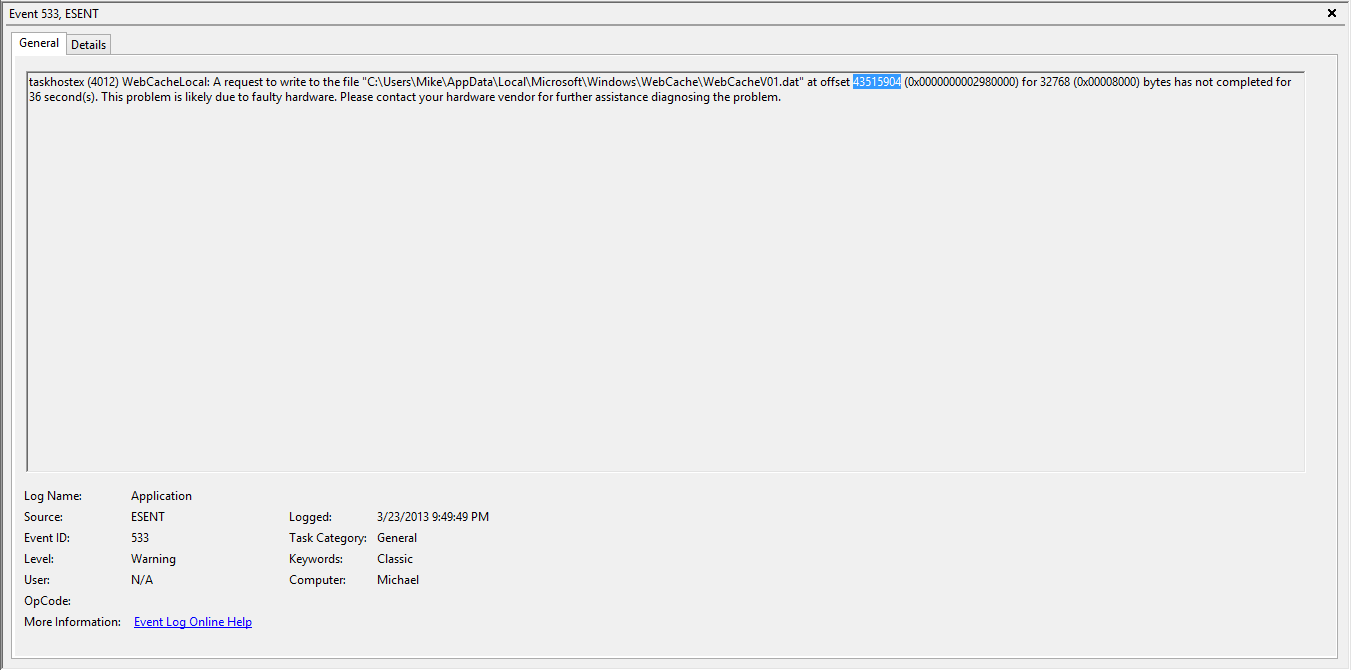
    This is a screenshot of the error I get when playing any game on my computer. This eventually leads to my computer crashing and other problems with sound


    Reply With Quote Reply With Quote

  6. #6
    Saltgrass is offline Senior Member
    Enjoys Windows 8 Forums
     
    Join Date
    Sep 2011
    Location
    Dallas
    Posts
    324
    Windows 8 Firefox 19.0

    Re: Reset to device, \Device\RaidPort0, was issued.

    I don't show the path on my system that is referenced in the error message.

    Looking for ESENT and Error ID 533 I found the following reference. But it appears whatever is trying to write to that location is not able. Possibly due to an anti-virus, or something else.

    Security Event Descriptions

    Is there nothing in your action center that might help, or have you sent the info to Microsoft?

    Reply With Quote Reply With Quote

Similar Threads

  1. Track Santa from your Windows 8 device
    By Windows 8 Forums in forum Windows 8 News
    Replies: 0
    Last Post: 12-10-2012, 01:10 PM
  2. Replies: 10
    Last Post: 11-19-2012, 10:44 PM
  3. Which type of device is best for Windows 8?
    By Windows 8 Forums in forum Windows 8 News
    Replies: 0
    Last Post: 10-06-2012, 07:30 AM
  4. Plug a WP7 device into a Windows 8 PC: nothing happens
    By Windows 8 Forums in forum Windows 8 News
    Replies: 0
    Last Post: 06-21-2012, 09:58 PM
  5. Windows 8: One device to rule them all?
    By Windows 8 Forums in forum Windows 8 News
    Replies: 0
    Last Post: 03-22-2012, 06:46 PM

Tags for this Thread

Posting Permissions

  • You may not post new threads
  • You may not post replies
  • You may not post attachments
  • You may not edit your posts
  •